如果数据不一致就会造成 ClassCaseException 类型转换异常,如下图所示:

import java.util.function.Supplier;

public class ThreadLocalByInitExample {
    // 定义 ThreadLocal
    private static ThreadLocal<String> threadLocal =
            ThreadLocal.withInitial(new Supplier<String>() {
                @Override
                public String get() {
                    System.out.println("执行 withInitial() 方法");
                    return "默认值";
                }
            });
    public static void main(String[] args) {
        // 线程执行任务
        Runnable runnable = new Runnable() {
            @Override
            public void run() {
                String threadName = Thread.currentThread().getName();
                // 执行方法,打印线程中设置的值
                print(threadName);
            }
        };
        // 创建并启动线程 1
        new Thread(runnable, "MyThread-1").start();
        // 创建并启动线程 2
        new Thread(runnable, "MyThread-2").start();
    }

    /**
     * 打印线程中的 ThreadLocal 值
     * @param threadName 线程名称
     */
    private static void print(String threadName) {
        // 得到 ThreadLocal 中的值
        String result = threadLocal.get();
        // 打印结果
        System.out.println(threadName   " 得到值:"   result);
    }
}
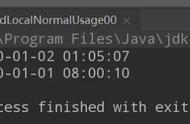
以上程序的执行结果为:

通过上述的代码发现,withInitial 方法的使用好和 initialValue 好像没啥区别,那为啥还要造出两个类似的方法呢?客官莫着急,继续往下看。
③ 更简洁的 withInitial 使用withInitial 方法的优势在于可以更简单的实现变量初始化,如下代码所示:
public class ThreadLocalByInitExample {
    // 定义 ThreadLocal
    private static ThreadLocal<String> threadLocal = ThreadLocal.withInitial(() -> "默认值");
    public static void main(String[] args) {
        // 线程执行任务
        Runnable runnable = new Runnable() {
            @Override
            public void run() {
                String threadName = Thread.currentThread().getName();
                // 执行方法,打印线程中设置的值
                print(threadName);
            }
        };
        // 创建并启动线程 1
        new Thread(runnable, "MyThread-1").start();
        // 创建并启动线程 2
        new Thread(runnable, "MyThread-2").start();
    }

    /**
     * 打印线程中的 ThreadLocal 值
     * @param threadName 线程名称
     */
    private static void print(String threadName) {
        // 得到 ThreadLocal 中的值
        String result = threadLocal.get();
        // 打印结果
        System.out.println(threadName   " 得到值:"   result);
    }
}
以上程序的执行结果为:

了解了 ThreadLocal 的使用之后,我们回到本文的主题,接下来我们将使用 ThreadLocal 来实现 1000 个时间的格式化,具体实现代码如下:
import java.text.SimpleDateFormat;
import java.util.Date;
import java.util.concurrent.LinkedBlockingQueue;
import java.util.concurrent.ThreadPoolExecutor;
import java.util.concurrent.TimeUnit;

public class MyThreadLocalByDateFormat {
    // 创建 ThreadLocal 并设置默认值
    private static ThreadLocal<SimpleDateFormat> dateFormatThreadLocal =
            ThreadLocal.withInitial(() -> new SimpleDateFormat("mm:ss"));

    public static void main(String[] args) {
        // 创建线程池执行任务
        ThreadPoolExecutor threadPool = new ThreadPoolExecutor(10, 10, 60,
                TimeUnit.SECONDS, new LinkedBlockingQueue<>(1000));
        // 执行任务
        for (int i = 0; i < 1000; i  ) {
            int finalI = i;
            // 执行任务
            threadPool.execute(new Runnable() {
                @Override
                public void run() {
                    // 得到时间对象
                    Date date = new Date(finalI * 1000);
                    // 执行时间格式化
                    formatAndPrint(date);
                }
            });
        }
        // 线程池执行完任务之后关闭
        threadPool.shutdown();
        // 线程池执行完任务之后关闭
        threadPool.shutdown();
    }
    /**
     * 格式化并打印时间
     * @param date 时间对象
     */
    private static void formatAndPrint(Date date) {
        // 执行格式化
        String result = dateFormatThreadLocal.get().format(date);
        // 打印最终结果
        System.out.println("时间:"   result);
    }
}
以上程序的执行结果为: